Le migliori alternative a Kit
Kit è fortissimo quando un creator possiede la relazione con l'audience e vuole un workflow di publishing focalizzato. Queste alternative coprono motivi diversi per cambiare: crescita della newsletter, contesto CRM, comportamento ecommerce, eventi di prodotto o controllo infrastrutturale.
La risposta breve: per crescita editoriale vai su beehiiv, per semplicità economica su MailerLite, per paid publishing su Substack, per proprietà su Ghost, per contesto prodotto su Customer.io.
Sintesi
Crescita newsletter → beehiiv. Referral e recommendation network. Semplicità economica → MailerLite. Da 12 $/mese con tutto l'essenziale. Paid publishing → Substack. Abbonamenti senza configurare nulla. Proprietà → Ghost. Sito + membership tuoi. Audience dentro di un prodotto → Customer.io. Journey guidati dagli eventi.
Confronto rapido
| Alternativa | Ideale per | Prezzo | Compromesso principale |
|---|---|---|---|
| beehiiv | Crescita e publishing | Gratis + piani | Meno automazioni comportamentali |
| MailerLite | Semplicità economica | 12 $/mese | Meno contesto creator-commerce |
| Substack | Paid publishing | Revenue-share 10% | Meno controllo e automazioni |
| Ghost | Pubblicazione di proprietà | Starter da 15 $/mese (listino, fatturazione annuale); se lo installi tu, il server si paga a parte | Serve setup tecnico |
| Brevo | Marketing + transazionale | 9 $/mese | Meno workflow editoriale |
| Customer.io | Audience prodotto | 100 $/mese | Serve team dati |
beehiiv: per crescere come pubblicazione
L'alternativa più diretta quando publishing, referral e crescita sono il centro del business: il workflow è disegnato intorno alla testata, non a un CRM generico, e le operazioni editoriali si delegano più facilmente.
Confronta i confini delle automazioni prima di cambiare: se il tuo setup Kit usa tag dettagliati, acquisti o stati di accesso ai corsi, verifica come quei segnali entrano in beehiiv e se possono sopprimere o ramificare una sequenza in modo affidabile.
MailerLite: per semplificare e risparmiare
Per creator che vogliono builder pulito, form, landing e automazioni lineari senza una grande piattaforma: il percorso audience è quasi sempre iscrizione, apprendimento, broadcast regolari. Costa poco e non chiede manutenzione mentale.
Può richiedere più lavoro per riprodurre logiche di commerce o tagging creator-specifiche. Esporta le regole vere dietro ogni sequenza Kit, non solo i testi delle email, prima di decidere che il workflow è equivalente.
Substack e Ghost: publishing puro
Substack per scrittori il cui prodotto è la newsletter stessa: distribuzione, abbonamenti e discovery in un unico ambiente. Ghost per chi vuole testata e membership di proprietà come unico sistema di contenuti. Il primo massimizza la velocità, il secondo il controllo.
Entrambi sacrificano segmentazione elaborata e journey lifecycle brandizzati: trattali come decisioni di modello di business, non come semplici migrazioni di piattaforma.
Customer.io e Brevo: quando l'audience è altro
Customer.io quando l'audience Kit è diventata un lifecycle di prodotto: trial, uso delle funzioni, attivazione ed espansione determinano i messaggi. Brevo quando al creator business servono anche conferme, ricevute e transazionali sotto lo stesso tetto.
Il primo chiede infrastruttura eventi e identità; il secondo chiede di tenere separati stream, consensi e deliverability tra newsletter e messaggi operativi.
Conviene passare da Kit a beehiiv?
Sì se la crescita editoriale è il collo di bottiglia e le automazioni commerce sono secondarie. No se vendi corsi e prodotti con logiche complesse: lì Kit resta superiore.
Quale alternativa costa meno?
MailerLite (12 $/mese) per qualità-prezzo, Brevo (9 $/mese) per ampiezza, Ghost self-hosted per proprietà a costo hosting. Kit stesso è gratis fino a 10.000 contatti.
E se ho anche un SaaS oltre ai contenuti?
Separa i mondi: Kit o beehiiv per l'audience dei contenuti, Customer.io (da 100 $/mese) o, per partire in piccolo, Brevo (da 18 $/mese per le automazioni) per onboarding e trial del prodotto. Mescolarli sporca entrambi i dataset.
Verdetto
Resta su Kit se monetizzi contenuti con sequenze. Muoviti verso beehiiv per crescere come testata, MailerLite per semplificare, Substack/Ghost per publishing puro, Customer.io quando l'audience vive nel prodotto. Vedi anche la classifica completa e le altre alternative.
Quanto costa restare su Kit rispetto ad andarsene
Il motivo più frequente per cercare un'alternativa a Kit è la fattura che sale con gli iscritti. Secondo la pagina prezzi di Kit, il piano gratuito arriva a 10.000 iscritti con moduli, pagine e broadcast illimitati, ma sequenze e automazioni visuali partono dal piano Creator.
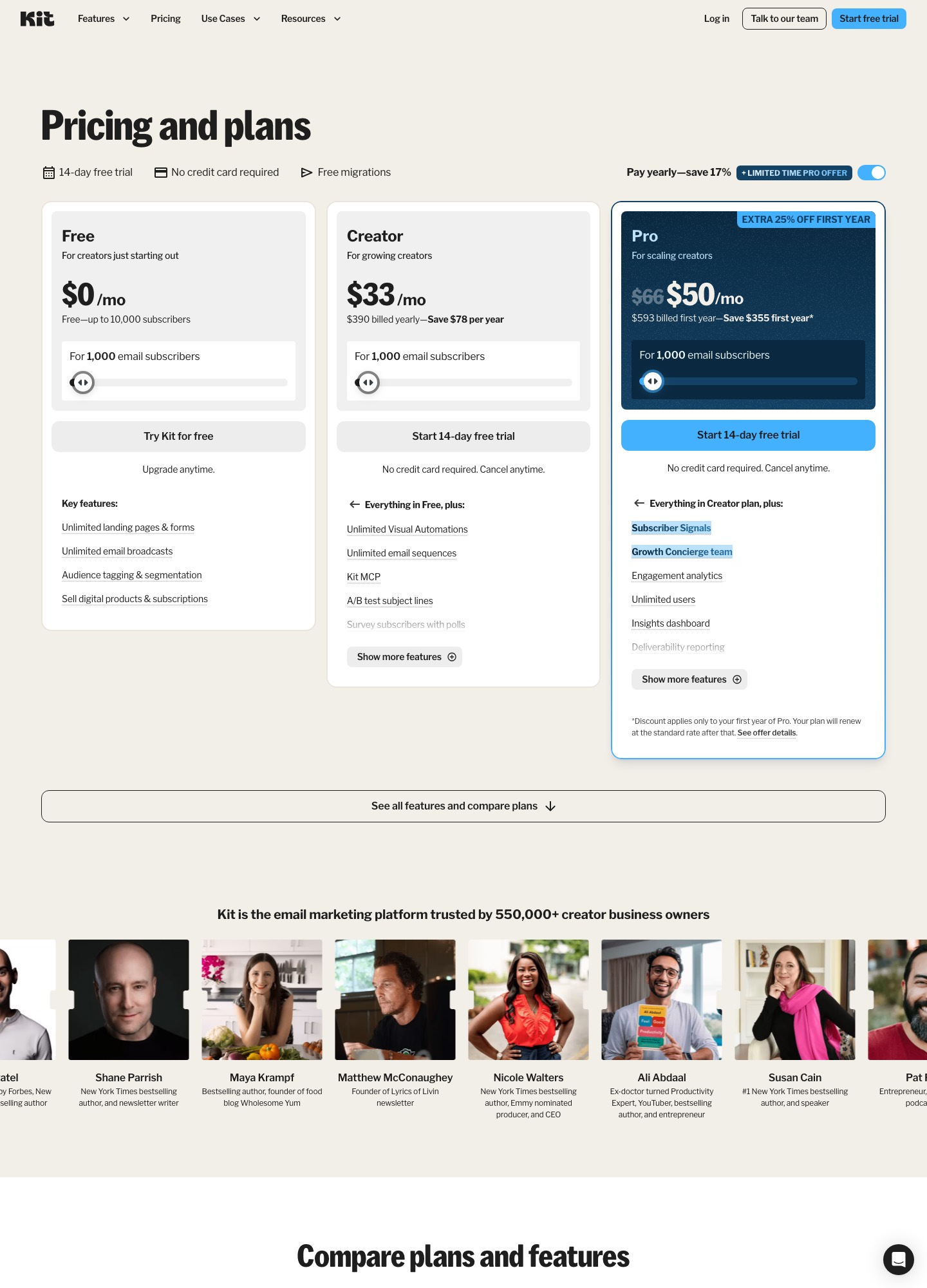
| Voce | Cosa indica il listino di Kit | Cosa significa per chi valuta il cambio |
|---|---|---|
| Piano gratuito | Fino a 10.000 iscritti, senza sequenze né automazioni visuali | Se ti bastano broadcast e moduli, difficilmente trovi un gratuito più generoso |
| Creator a 1.000 iscritti | 33 $/mese con fatturazione annuale (390 $ l'anno) | È il punto da confrontare con MailerLite, Brevo o beehiiv alla stessa lista |
| Creator a 10.000 iscritti | 116 $/mese con fatturazione annuale secondo il cursore della pagina | Qui la differenza con i listini più economici diventa una voce di bilancio |
| Piano Pro | Aggiunge utenti illimitati, report di deliverability e sistema di referral | Il referral integrato è la funzione da cui dipende il confronto con beehiiv |
| Migrazione e prova | Prova gratuita di 14 giorni e migrazioni gratuite indicate sulla pagina | Se vai verso Kit, non paghi per entrare; se esci, non esiste un servizio equivalente garantito |
Creator con sequenze e tag: quanto cambia davvero con ogni scelta
| Come usi Kit oggi | Dove guardare | Rischio da mettere in conto |
|---|---|---|
| Invii solo broadcast ai tuoi iscritti | Piano gratuito di beehiiv o MailerLite | Quasi nessuno: è la migrazione più semplice |
| Hai sequenze di benvenuto legate a tag | MailerLite o beehiiv, a pagamento | Le regole dei tag vanno riscritte una per una |
| Vendi corsi o prodotti digitali con i tag di acquisto | Resta su Kit, oppure Ghost se vuoi tutto in un sito | Perdi i segnali di accesso e i collegamenti ai pagamenti |
| Pubblichi una newsletter a pagamento | Substack, Ghost o beehiiv | Cambia il modello di ricavo, non solo la piattaforma |
| Hai lanci con molte email in poche ore | Verifica i limiti di invio giornalieri del nuovo piano | Un limite giornaliero basso spezza un lancio a metà |
| Parte dell'audience è anche utente di un software | Brevo per iniziare, Customer.io se hai un team dati | Mescolare contenuti e dati prodotto sporca entrambi |
Prima di scegliere ti serve una mappa dei flussi: la guida alle sequenze di benvenuto aiuta a distinguere ciò che va ricostruito da ciò che puoi buttare, e il confronto Kit contro Mailchimp mostra come un grande concorrente affronta gli stessi temi.
Cosa fare nella settimana del passaggio
- Elenco dei tag attivi: per ogni tag scrivi quale sequenza o quale offerta attiva e quanti iscritti lo portano, così sai cosa ricostruire per primo.
- Moduli incorporati: trova ogni modulo Kit sul sito, nelle pagine di destinazione e nei link dei social e sostituiscili nello stesso momento.
- Link dei prodotti: controlla i collegamenti tra checkout, area corsi e tag di acquisto, perché sono quelli che si rompono senza avvisare.
- Mittente conosciuto: mantieni lo stesso nome e indirizzo mittente e invia il primo numero a lettori che hanno aperto di recente.
- Doppio abbonamento: tieni l'account Kit attivo fino al completamento delle sequenze già avviate, poi chiudilo con un'esportazione finale degli iscritti.
Termini che cambiano significato da una piattaforma creator all'altra
| Termine | Significato operativo |
|---|---|
| Tag | Etichetta applicata a un iscritto per descriverne un interesse o un acquisto. In Kit guida spesso sequenze e offerte; altrove può essere sostituita da gruppi o campi personalizzati. |
| Sequenza | Serie di email che parte da un evento, per esempio l'iscrizione, con tempi di attesa tra un messaggio e l'altro. Va ricostruita, non importata. |
| Broadcast | Email singola inviata a tutta la lista o a un segmento, come un numero della newsletter. |
| Visual Automation | Editor a diagramma di Kit per costruire percorsi condizionali; ogni piattaforma ha un proprio formato, quindi non esiste esportazione diretta. |
| Pagina di destinazione | Pagina dedicata a una sola azione, di solito l'iscrizione o l'acquisto. Cambia l'indirizzo e quindi anche i link già pubblicati. |
Clausole da leggere quando disdici Kit o scegli il sostituto
| Clausola | Cosa controllare | Nota |
|---|---|---|
| Fatturazione annuale | Se hai pagato il Creator per dodici mesi, cosa resta del periodo non usato dopo la disdetta | Sposta la migrazione verso la scadenza del rinnovo, non a metà anno. |
| Dati dei tag e delle sequenze | Se l'esportazione include i tag di ogni iscritto e la data di iscrizione | Senza tag la nuova piattaforma vede solo un elenco di indirizzi. |
| Pagamenti dei prodotti | Chi incassa: il processore di pagamento resta lo stesso o cambia titolare dell'incasso | Se i pagamenti passano da una piattaforma all'altra, informa i clienti prima del cambio. |
| Responsabile del trattamento | Se il DPA copre sia gli iscritti sia i dati di acquisto di chi compra i tuoi prodotti | L'informativa del sito deve nominare il nuovo fornitore dal giorno del passaggio. |
Domande frequenti
Cosa devo ricostruire quando lascio Kit?
Gli iscritti si esportano, ma tag, form di iscrizione, sequenze automatiche e pagine di destinazione vanno rifatti nella nuova piattaforma, e così anche i collegamenti con il sistema di pagamento. Prima di chiudere l'account fai un inventario delle sequenze attive e dei tag che le attivano: sono la parte che si dimentica più spesso. Tieni attiva Kit per qualche settimana dopo il passaggio, così i flussi in corso non si interrompono a metà.
Se vendo corsi o prodotti digitali, quale alternativa è adatta?
Dipende da chi gestisce il pagamento. beehiiv include gli abbonamenti a pagamento dal piano Lite (49 $/mese con fatturazione annuale), Ghost dal piano Publisher (29 $/mese con fatturazione annuale) e Substack trattiene il 10% dei ricavi senza canone. Se vendi prodotti singoli e non abbonamenti, controlla che la piattaforma lo preveda esplicitamente, perché non tutte lo fanno.
Posso restare su un piano gratuito dopo aver lasciato Kit?
Sì, entro limiti precisi: beehiiv è gratuito fino a 2.500 iscritti, MailerLite offre fino a 250 iscritti e 2.500 email al mese, Brevo consente 300 invii al giorno e Substack permette di pubblicare gratis, con commissioni solo sui contenuti a pagamento. I limiti sono diversi per natura: alcuni contano gli iscritti, altri gli invii. Confrontali con la tua frequenza di invio, non solo con le dimensioni della lista.
Come evito di finire in spam dopo il cambio di piattaforma?
Autentica il dominio di invio con SPF e DKIM sulla nuova piattaforma prima del primo invio, e se possibile usa lo stesso indirizzo mittente a cui i lettori sono abituati. Per i primi numeri scrivi a un segmento ristretto di lettori attivi, guarda rimbalzi e segnalazioni, poi allarga. Una migrazione completa in un solo invio, soprattutto con liste vecchie, è il modo più rapido per rovinare la reputazione del mittente.
Il consenso dei miei iscritti vale anche con la nuova piattaforma?
Il consenso dato a te come editore resta valido, ma l'informativa deve nominare il nuovo fornitore e ti serve un accordo di trattamento dei dati con lui. Il doppio opt-in non è richiesto dal GDPR, tuttavia aiuta a dimostrare quando e come una persona si è iscritta. Se per una parte della lista non hai alcuna traccia del consenso, la scelta prudente è non importarla.