Le migliori alternative a EmailOctopus
EmailOctopus è il benchmark per chi ha come priorità invii semplici e sequenze base a costo contenuto. Le alternative hanno senso quando servono landing migliori, transazionale unito, ecosistema più ampio o automazioni che crescono col business.
La risposta breve: per usabilità simile con più funzioni vai su MailerLite; per unire transazionale su Brevo; per ecosistema su Mailchimp; per crescere verso automazioni serie su ActiveCampaign.
Sintesi
Stesso spirito, più funzioni → MailerLite. Da 12 $/mese con landing e automazioni. Transazionale unito → Brevo. 9 $/mese con SMS. Ecosistema → Mailchimp. Integrazioni con tutto. Creator → Kit. Gratis fino a 10k. Crescita automazioni → ActiveCampaign. Scoring e rami.
Confronto rapido
| Alternativa | Ideale per | Prezzo | Compromesso principale |
|---|---|---|---|
| MailerLite | Workflow semplice e completo | 12 $/mese | Il costo cambia col piano |
| Brevo | Marketing + transazionale | 9 $/mese | Prezzo a volumi diverso |
| Mailchimp | Integrazioni ampie | 13 $/mese | Costo totale più alto |
| Kit | Creator e audience | Gratis fino a 10k | Meno infrastruttura generale |
| beehiiv | Newsletter come prodotto | Gratis + piani | Meno automazioni marketing |
| ActiveCampaign | Automazioni mature | 15 $/mese | Più amministrazione |
MailerLite: il passaggio naturale
L'alternativa più naturale per chi vuole un workflow campagne simile con landing migliori e automazioni base: stessa filosofia accessibile, più rifinitura. Confronta conteggio iscritti, template, permessi e supporto deliverability alla tua dimensione reale di lista.
Più funzioni cambiano il modello di costo: verifica il prezzo a 12 mesi con la tua crescita prima di considerare il passaggio un risparmio.
Brevo: unire i mondi
Per team che vogliono newsletter, automazioni e consegna transazionale senza un secondo fornitore: un account, una fattura, reputazioni gestibili separatamente.
Tieni separati stream transazionali, identità mittente e consensi promozionali in migrazione: il risparmio non deve costare la deliverability dei messaggi critici.
Quando restare su EmailOctopus
Se il carico reale è form, broadcast e sequenze base — e resta tale — EmailOctopus resta il benchmark: modello operativo snello e costi prevedibili. Usa il carico effettivo (form, automazioni, integrazioni, report) per decidere se il cambio risolve una limitazione reale o insegue funzioni che non userai.
Quale alternativa è più economica?
Brevo (9 $/mese) e MailerLite (12 $/mese) restano nella stessa fascia di EmailOctopus; Kit è gratis fino a 10.000 per creator. Il risparmio vero dipende dai volumi, non dal listino.
Perdo deliverability migrando?
No se migri bene: autentica il dominio (SPF, DKIM, DMARC), scalda i volumi per due settimane e non importare mai liste fredde. La deliverability segue le pratiche, non il logo.
E per un SaaS?
Nessuna di queste è costruita per onboarding e fatturazione: per un SaaS con eventi di prodotto valuta Customer.io (da 100 $/mese) oppure, con un team piccolo, le automazioni di Brevo dal piano Standard (18 $/mese).
Verdetto
Resta su EmailOctopus se broadcast e sequenze base bastano. Muoviti verso MailerLite per rifinitura, Brevo per unificare, Mailchimp per ecosistema, ActiveCampaign per crescere. Vedi anche la classifica completa e le altre alternative.
Perché il listino di EmailOctopus è difficile da battere sul prezzo
Prima di cercare un'alternativa guarda quanto poco chiede la pagina prezzi di EmailOctopus. Il confronto serve a capire quale limite del piano ti blocca, non a cercare un risparmio che probabilmente non esiste.
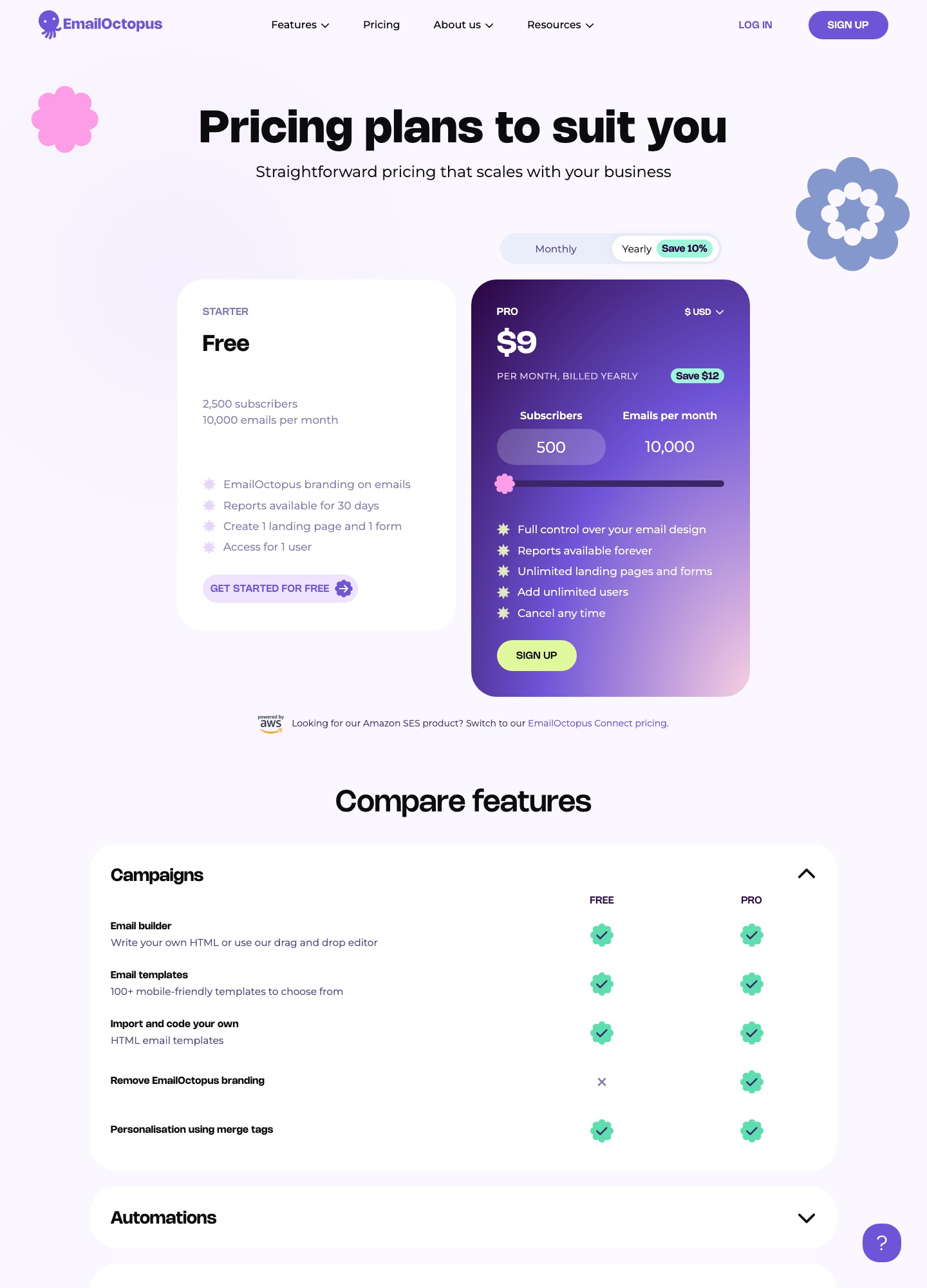
| Limite | Piano Free | Piano Pro (9 $/mese, pagamento annuale) |
|---|---|---|
| Iscritti | Fino a 2.500 | Il cursore della pagina mostra 9 $/mese a 10.000 iscritti; il canone sale con la lista |
| Email al mese | 10.000 | 10.000 al conteggio selezionato sulla pagina |
| Marchio nelle email | Presente | Non elencato tra i limiti del piano |
| Pagine e moduli | Una pagina di destinazione e un modulo | Illimitati |
| Utenti e report | Un utente; report conservati 30 giorni | Utenti illimitati; report conservati senza scadenza |
Il limite reale per molti è il tetto di invii e la conservazione dei report: se ti serve lo storico oltre 30 giorni, il confronto con MailerLite o Brevo ha senso solo su quel punto.
Quale limite ti ha spinto a cercare altro
| Il limite che senti | Dove guardare | Cosa guadagni e cosa no |
|---|---|---|
| Servono landing page e moduli oltre il primo | Il piano Pro stesso, prima di cambiare | Pagine e moduli illimitati senza migrare nulla |
| Le automazioni sono troppo lineari | MailerLite o ActiveCampaign | Rami e condizioni, ma più tempo di configurazione |
| Servono email di sistema (conferme, ricevute) | Brevo | Un solo account, ma flussi e consensi da tenere separati |
| Vuoi vendere un corso o un prodotto | Kit | Vendita e tag integrati, con un listino più alto oltre il gratuito |
| La newsletter è il tuo prodotto | beehiiv o Ghost | Pubblicazione e crescita, non più solo invio |
| Hai bisogno solo di invii economici e affidabili | Resta su EmailOctopus | Il risparmio di un cambio sarebbe di pochi dollari |
Se la segmentazione è il vero ostacolo, leggi la guida alla segmentazione e il confronto degli strumenti di automazione email.
Prima di lasciare un piano economico
- Il costo a un anno: calcola il canone con la crescita prevista della lista nei prossimi dodici mesi, non con il numero di iscritti di oggi, e confrontalo con quello di EmailOctopus alla stessa dimensione.
- Funzione mancante: scrivi quale limite vuoi superare e verifica che il piano che stai per pagare lo risolva davvero, non soltanto nel confronto di una pagina commerciale.
- Marchio: guarda come appare il piè di pagina di una mail di prova, perché è la differenza visibile al lettore tra il piano gratuito e uno a pagamento.
- Storico dei report: esporta i report che servono, dato che sul piano gratuito sono conservati solo per 30 giorni.
- Invii di prova a un segmento: manda il primo numero al gruppo più attivo e controlla rimbalzi e segnalazioni prima di estendere a tutta la lista.
Termini per leggere i limiti di un piano economico
| Termine | Significato operativo |
|---|---|
| Tetto di invii mensili | Numero massimo di email spedibili in un mese. Si calcola moltiplicando iscritti per frequenza: 2.500 iscritti con 4 uscite al mese raggiungono già 10.000. |
| Upgrade automatico | Passaggio al piano superiore quando la lista supera la soglia, senza una richiesta esplicita. Verifica se avviene e con quale preavviso. |
| Conservazione dei report | Per quanto tempo la piattaforma tiene statistiche di apertura e clic. Se è breve, esporta i dati che ti servono prima della scadenza. |
| Marchio del fornitore | Frase o logo aggiunti in fondo alle email dei piani più bassi. Rimuoverlo è spesso la ragione concreta per passare a pagamento. |
| Domain authentication | Configurazione di SPF e DKIM che dimostra ai provider di posta che il dominio autorizza il servizio a inviare per suo conto. |
Cosa leggere nelle condizioni di un piano a basso costo
| Clausola | Cosa controllare | Nota |
|---|---|---|
| Pagamento annuale | Il Pro si paga in un'unica soluzione per dodici mesi: verifica rimborso e disdetta anticipata | Il risparmio mensile sparisce se devi cambiare strumento dopo tre mesi. |
| Politica antiabuso | Soglie di rimbalzi e segnalazioni di spam oltre le quali l'account viene limitato | Prima di caricare la lista leggi anche come si contesta una sospensione. |
| Assistenza inclusa | Canale e tempi di risposta per piano gratuito e a pagamento | Chiedi se l'assistenza copre anche il gratuito: conta quando un invio si blocca. |
| Responsabile del trattamento | Se il fornitore mette a disposizione un DPA e indica i suoi sub-responsabili | Obbligo tuo di titolare anche con un servizio da pochi dollari al mese. |
Domande frequenti
Cosa include il piano gratuito di EmailOctopus e quando smette di bastare?
La pagina prezzi di EmailOctopus indica fino a 2.500 iscritti e 10.000 email al mese, con il marchio EmailOctopus nelle email. Con la lista al limite il tetto equivale a quattro invii al mese per iscritto (10.000 ÷ 2.500), quindi basta una newsletter settimanale più qualche promozione per superarlo. Il piano Pro parte da 9 $/mese secondo la stessa pagina.
Quanto si risparmia davvero passando a un'alternativa più economica?
Molto poco, e spesso nulla: EmailOctopus è già tra gli strumenti meno cari per le newsletter. Brevo costa 9 $/mese per il piano Starter ma da Standard (18 $/mese) in su aggiunge automazioni e test A/B, mentre MailerLite parte da 12 $/mese per Comfort. Si cambia piattaforma per le funzioni che mancano, non per risparmiare qualche euro.
Cosa succede al marchio nelle email se resto sul piano gratuito?
Sul piano gratuito le email portano il marchio del fornitore, come indicato nella pagina prezzi. Per una newsletter personale non è un problema, per un'attività commerciale che invia ai clienti può essere un freno alla credibilità. Prima di decidere, guarda un'email di prova ricevuta come la vedrebbe il lettore: se il marchio disturba, quella è già la ragione per passare a pagamento o cambiare strumento.
Come sposto la lista senza reinviare a chi si era già disiscritto?
Esporta gli iscritti attivi e, separatamente, le disiscrizioni e gli indirizzi rimbalzati, poi carica sulla nuova piattaforma l'elenco delle soppressioni prima della lista attiva. Molte piattaforme confrontano le due liste in importazione, ma non tutte lo fanno in modo automatico: controlla il numero finale di contatti rispetto all'esportazione. Un indirizzo rimesso in lista per errore è una segnalazione di spam in arrivo.
Per un'attività italiana cambia qualcosa nel GDPR rispetto a prima?
Il fornitore cambia ma gli obblighi restano gli stessi: informativa aggiornata con il nome del nuovo strumento, consenso documentato per ogni iscritto, link di disiscrizione funzionante in ogni messaggio e un accordo di trattamento con la piattaforma. Se oggi non puoi dimostrare come e quando un contatto si è iscritto, la migrazione è il momento giusto per chiedere una conferma e importare solo chi risponde.