Le migliori alternative a Encharge
Encharge piace a chi ragiona per flussi visuali e vuole automazioni comportamentali senza adottare una customer-data platform. Le alternative coprono tre direzioni: più profondità eventi (Customer.io), contesto CRM e vendite (HubSpot, ActiveCampaign), o semplicità SaaS (Userlist, Loops).
La risposta breve: per eventi profondi vai su Customer.io; per CRM e vendite su HubSpot o ActiveCampaign; per restare SaaS-leggero su Userlist o Loops; per semplicità economica su Brevo o MailerLite.
Sintesi
Eventi profondi → Customer.io. 100 $/mese con team dati. CRM + vendite → HubSpot / ActiveCampaign. Contesto commerciale condiviso. SaaS leggero → Userlist / Loops. Prodotto al centro, poca infrastruttura. Budget + ampiezza → Brevo. 9 $/mese con SMS e transazionale.
Confronto rapido
| Alternativa | Ideale per | Prezzo | Compromesso principale |
|---|---|---|---|
| Customer.io | Journey guidati dagli eventi | 100 $/mese | Serve team dati |
| HubSpot | Automazioni legate al CRM | Gratis + hub | Piattaforma pesante |
| Userlist | Contesto prodotto SaaS | Piani a contatti | Superficie più stretta |
| Loops | Lifecycle startup | Gratis fino a 1.000 contatti; 99 $/mese a circa 10.000 (listino) | Orchestrazione semplice |
| ActiveCampaign | Scoring e vendite | 15 $/mese | Più amministrazione |
| Brevo | Ampiezza economica | 9 $/mese | Meno profondità visuale |
Customer.io: più profondità eventi
L'alternativa più forte quando ai flussi visuali servono eventi prodotto più profondi, ramificazioni e contesto comportamentale. Stessa filosofia visiva, motore dati di un'altra categoria.
La potenza extra chiede regole di identità, tassonomia eventi, soppressioni e più QA tecnica. Senza quel governo, la migrazione complica invece di migliorare.
HubSpot e ActiveCampaign: contesto commerciale
HubSpot quando l'automazione deve condividere proprietà, form, assistenza e stadi lifecycle con le vendite. ActiveCampaign quando ai flussi servono anche scoring, passaggi commerciali e logica condizionale matura.
Entrambi aggiungono amministrazione: campi, proprietari e condizioni di uscita vanno governati, o la semplicità visuale di Encharge verrà rimpianta.
Userlist e Loops: restare SaaS-leggeri
Userlist quando utenti, account e comportamento prodotto devono restare centrali senza un CRM generale. Loops per startup che vogliono un sistema email focalizzato senza ogni ramo di una grande suite visuale.
Verifica integrazioni, broadcast e reportistica se Encharge oggi serve anche il marketing oltre l'onboarding: il perimetro più stretto deve comunque coprire il tuo carico reale.
Brevo: semplificare e risparmiare
Quando il team scopre che servono soprattutto campagne, form e qualche sequenza lineare: 9 $/mese con SMS e transazionale inclusi. Non riproduce rami comportamentali complessi — ma spesso si scopre che non servivano davvero.
Migra per comportamento, non per layout delle schermate: un canvas simile non garantisce flussi equivalenti.
Quale alternativa è più simile a Encharge?
ActiveCampaign per canvas visuale + profondità, Customer.io per logica eventi. Nessuno è identico: mappa trigger e destinazioni reali prima di scegliere.
E per un SaaS che fattura abbonamenti?
Il criterio è quali eventi di fatturazione ti servono (rinnovo, carta scaduta, upgrade, cancellazione) e se la piattaforma li riceve dal sistema di pagamento tramite integrazione o API. Verificalo con una prova su un account reale: Customer.io (da 100 $/mese) e Encharge (da 99 $/mese) accettano eventi personalizzati, ma ciò che arriva davvero dipende da come li invii.
Quanto è difficile migrare i flussi?
Ricrea un flusso di onboarding, poi testa passi ritardati, sync falliti, cancellazioni e re-entry prima di migrare il programma intero. La checklist vale più del confronto feature.
Verdetto
Sali a Customer.io per eventi, allarga a HubSpot/ActiveCampaign per vendite, semplifica con Userlist/Loops per SaaS, risparmia con Brevo. Vedi anche Customer.io vs Userlist, la classifica completa e le altre alternative.
Il costo di Encharge a diverse dimensioni di lista
La pagina prezzi di Encharge fa pagare per iscritti, con un gradino ogni volta che la lista cresce. Ecco i numeri con fatturazione mensile del piano Growth che servono per confrontarlo con un'alternativa.
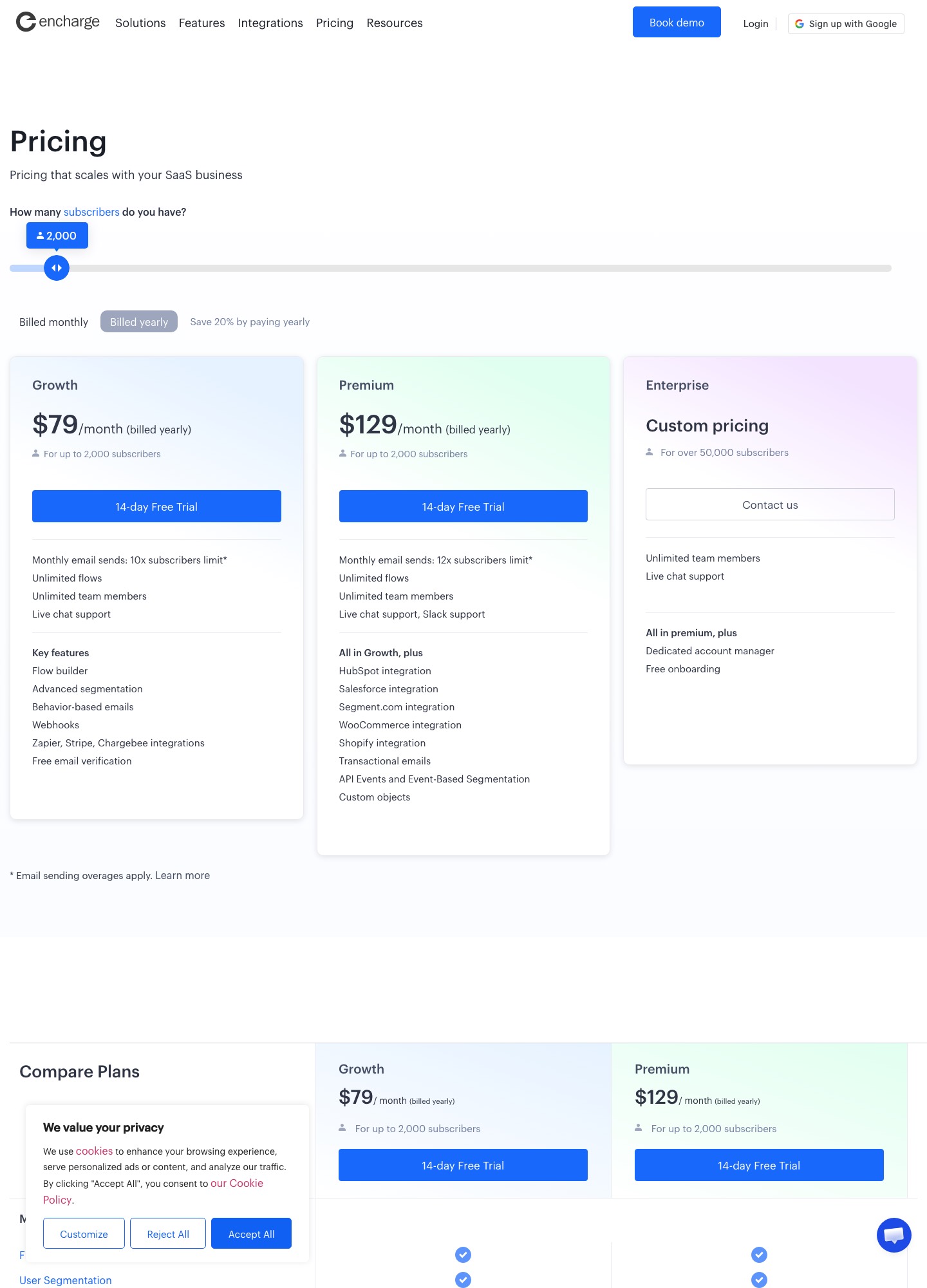
| Iscritti | Growth (mensile) | Premium (mensile) |
|---|---|---|
| Fino a 2.000 | 99 $ (79 $ con pagamento annuale) | 159 $ (129 $ con pagamento annuale) |
| Fino a 5.000 | 179 $ | 269 $ |
| Fino a 10.000 | 249 $ | 399 $ |
| Fino a 25.000 | 389 $ | 649 $ |
Il Premium aggiunge le integrazioni con HubSpot e Salesforce e l'email transazionale; il Growth include flussi e membri del team illimitati e un tetto di invii pari a 10 volte gli iscritti. Il confronto più utile è con Customer.io Essentials, che parte da 100 $/mese per 5.000 profili e conta le persone, non gli iscritti: a lista pari, il canone di Encharge a 5.000 iscritti è quasi il doppio di quel punto di partenza, e la distanza si misura sui tuoi profili reali.
Perché si lascia Encharge: il motivo decide la destinazione
| Il motivo che senti | Direzione | Cosa porti con te e cosa perdi |
|---|---|---|
| Il canone cresce più in fretta della lista | Customer.io (conta profili) o Brevo | Cambia l'unità di conteggio, quindi rifai il calcolo sui profili reali |
| I flussi funzionano ma servono dati di prodotto più fitti | Customer.io | Eventi e oggetti più ricchi, con più lavoro di integrazione |
| Le vendite chiedono di vedere i segnali del prodotto | HubSpot o ActiveCampaign | Il database è condiviso con il CRM; l'editor dei flussi è diverso |
| Troppa piattaforma per un onboarding semplice | Loops o Userlist | Meno rami e meno integrazioni, ma più rapidi da gestire |
| Servono solo campagne e qualche sequenza lineare | Brevo o MailerLite | Canone molto più basso e nessun editor comportamentale |
| Le automazioni sono stabili e il team le conosce | Resta su Encharge | Una migrazione con identità ed eventi da rimappare costa mesi di lavoro |
Per ragionare su segmenti ed eventi prima di scegliere leggi la guida alla segmentazione e il confronto degli strumenti con automazioni visuali.
Cosa portare via da Encharge prima di cambiare
- Diagramma di ogni flusso: per ciascun flusso visuale salva uno schema con trigger, attese, condizioni e uscite, perché il canvas di Encharge non si esporta in un altro strumento.
- Tag e campi del profilo: elenca quelli che le email leggono e quelli che i flussi aggiornano, con il nome esatto usato oggi.
- Webhook e integrazioni: annota gli endpoint che inviano eventi a Encharge (Stripe, Chargebee, il tuo backend) e quelli che ricevono dati, così da duplicarli sul nuovo sistema.
- Email transazionali sul Premium: se le usi, decidi se restano nello stesso strumento o passano a un servizio separato con dominio e reputazione propri.
- Periodo di sovrapposizione: tieni Encharge attivo finché i flussi lunghi, come un onboarding di settimane, non sono finiti, controllando che le persone già uscite non rientrino nel nuovo flusso.
Termini delle automazioni visuali per SaaS
| Termine | Significato operativo |
|---|---|
| Flusso (flow) | Diagramma di passi collegati: un evento d'ingresso, attese, condizioni e azioni. Encharge li chiama flussi e il piano Growth ne include un numero illimitato. |
| Evento personalizzato | Azione dell'utente nel prodotto inviata via API o webhook con nome e proprietà scelti da te. Il nome deve essere identico nel nuovo strumento. |
| Billing trigger | Evento che nasce dal sistema di pagamento, come rinnovo, carta scaduta, upgrade o cancellazione, e che avvia un messaggio. |
| Dunning | Sequenza di messaggi che invita a correggere un pagamento non riuscito. Va ricostruita insieme agli eventi di fatturazione che la attivano. |
| Holdout | Piccolo gruppo di utenti tenuto fuori da un flusso per misurare che cosa cambia senza di esso. Dopo la migrazione serve per confrontare vecchio e nuovo. |
Clausole da leggere se esci da Encharge o ne firmi una simile
| Clausola | Cosa controllare | Nota |
|---|---|---|
| Limiti di invii ed eventi | Il piano fissa un tetto di invii mensili pari a un multiplo degli iscritti e un tetto di eventi; cosa succede quando li superi | Un picco di onboarding può esaurire il tetto degli eventi prima di quello degli iscritti. |
| Sconto annuale | Il pagamento annuale riduce il canone mensile, ma impegna per dodici mesi | Se stai valutando di cambiare, non rinnovare l'annuale prima di aver deciso. |
| Esportazione dei flussi | Se esiste un formato per portare via struttura, tag e storico, oltre alla lista contatti | Se non c'è, il costo dell'uscita è il tempo di riprogettazione dei flussi. |
| Hosting dei dati e DPA | La pagina prezzi non indica una regione dei dati: chiedila al fornitore e fatti inviare il DPA | Per utenti europei documenta il trasferimento verso gli Stati Uniti, se c'è. |
Domande frequenti
Quanto costa Encharge e quanti iscritti copre il prezzo di partenza?
Secondo la pagina prezzi di Encharge il piano Growth parte da 99 $/mese per fino a 2.000 iscritti e il Premium da 159 $/mese; non è indicato un piano gratuito permanente. A 2.000 contatti il confronto con Customer.io (Essentials da 100 $/mese) è quindi quasi alla pari sul canone, e la differenza la fanno profondità degli eventi e ore di lavoro per mantenere i flussi.
Quali flussi si ricostruiscono più facilmente su un'altra piattaforma?
Benvenuto, onboarding a tappe e recupero di utenti inattivi sono sequenze lineari e si rifanno in poche ore su qualsiasi strumento con editor visuale. Più laboriosi sono i flussi con più rami, attese condizionate a eventi di prodotto e aggiornamento di campi sul profilo: lì conviene disegnare prima il diagramma su carta e solo dopo ricostruirlo. La pagina prezzi di Customer.io cita un workflow builder visuale già nel piano Essentials.
Quando HubSpot ha più senso di Encharge?
Quando i messaggi di marketing devono dialogare con contatti, trattative e attività del team commerciale nello stesso database. HubSpot ha strumenti gratuiti con fino a 2.000 invii di email marketing al mese e il suo marchio nelle email (pagina prezzi), ma le automazioni avanzate richiedono i piani a pagamento superiori, molto più costosi. Per un SaaS senza team di vendita, la complessità in più raramente si ripaga.
Cosa succede ai contatti che sono a metà di un flusso durante la migrazione?
La soluzione più pulita è non migrarli: chiudi l'ingresso ai vecchi flussi su Encharge, lascia terminare quelli in corso e fai entrare i nuovi contatti nella piattaforma di destinazione. Se un flusso dura mesi, come un onboarding lungo, annota la data di chiusura e prevedi per quel periodo un controllo delle soppressioni tra i due sistemi. Evita di rimettere tutti in coda dal primo passo, perché un utente rischia di ricevere di nuovo il messaggio di benvenuto.
Quali dati devo preparare prima di scegliere la piattaforma di arrivo?
Un elenco degli eventi di prodotto che oggi attivano i flussi, con il nome esatto e le proprietà inviate; l'elenco dei campi del profilo che i messaggi leggono; e le integrazioni attive con CRM e sistema di pagamento. Con queste tre liste puoi chiedere a ogni fornitore una dimostrazione su un caso reale, invece di giudicare dalla pagina delle funzioni. Se un evento non arriva nella piattaforma di destinazione, il flusso corrispondente va ripensato prima di migrare.